Open Research Workflow

Quarto + Positron + GitHub + Zenodo

Olivier V. Raven

University of Waikato | ScienceEcosystem.org

2026-08-03

Why does this matter?

“Wait — which script made this number again?”

Six months after submission. Sound familiar?

  • Journals increasingly require data availability statements
  • Reviewers increasingly check that analyses are reproducible
  • Funders increasingly mandate open data

The problem: nobody teaches you how to actually do this

The tools

Tool Purpose
Quarto Write manuscript + analysis together
Positron IDE with built-in Git support
GitHub Host code, give reviewers access
renv Record exact R package versions
Zenodo Permanent archive + citable DOI

All free. All open source.

Bonus: proper LaTeX typesetting, one-line CSL swap to match any journal’s citation style, ORCID metadata flowing straight into the output — for free, not extra work.

Day 1: Setup in Positron

  • Create project folder structure
  • Source Control → Initialize Repository
  • Commit → Publish to GitHub (Public)
  • renv::init() + renv::snapshot()
  • zenodo.org → Settings → GitHub → toggle repo ON
my_paper/
├── _quarto.yml
├── index.qmd
├── analysis.qmd
├── data/
│   ├── raw/         # NEVER modify
│   └── derived/
├── outputs/
│   ├── figures/
│   └── tables/
├── references/
└── README.md

.gitignore keeps outputs/, raw data, and OS files out of version control — total time: ~20 minutes

The two-file approach

analysis.qmd

All your R code

  • Data cleaning
  • Statistical models
  • Figure & table generation
  • Session info

Renders to HTML

index.qmd

Your clean manuscript

  • Introduction
  • Methods
  • Results (figures, tables, inline stats)
  • Discussion

Renders to HTML / PDF / Word

Both version controlled together on GitHub

Numbers that stay in sync

Quarto can pull real numbers straight from your analysis into your prose — no more hand-typing a mean or p-value into the manuscript.

# analysis.qmd — compute it once, save what you want to report
report_stats <- list(
  mean_stone = summary_table$mean_length[summary_table$shelter_type == "stone"],
  pvalue = summary(model_preference)$coefficients[2, "Pr(>|t|)"]
)
saveRDS(report_stats, "outputs/report_stats.rds")
<!-- index.qmd -->
Carapace length differed significantly by shelter type
(mean stone = `r round(report_stats$mean_stone, 1)` mm,
p = `r round(report_stats$pvalue, 3)`).

Rendered output Carapace length differed significantly by shelter type (mean stone = 34.2 mm, p = 0.003).

Re-render → the manuscript updates itself. Change your model, get a new number for free.

Daily workflow

In the Positron Source Control panel:

Work → Stage (+) → Commit (✓) → Sync (↑)

Good commit messages “added linear model for shelter preference”

“fixed figure 3 axis label”

“updated discussion after reviewer 2 comment”

Bad commit messages “update”

“fix”

“changes”

“final version 3”
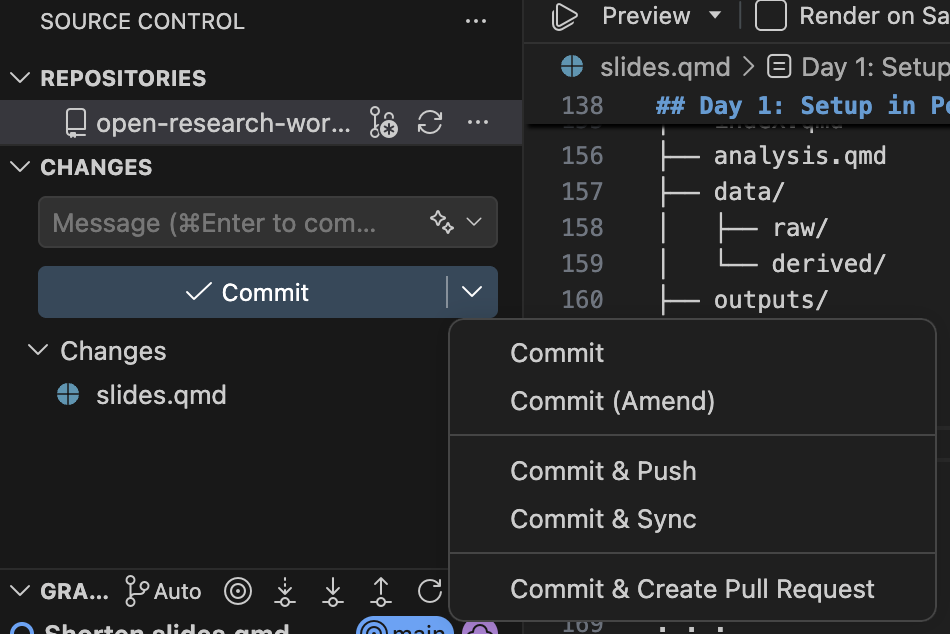
Positron’s Source Control panel — the same Stage / Commit / Sync flow, live.

The DOI timing problem

You need the DOI in the manuscript before submission, but you do not want to lock the version until after revisions.

The solution: Zenodo lets you reserve a DOI without publishing

Reserve DOI → submit → revise → accept → publish
     ↑                                       ↑
DOI exists                            DOI goes live
(not public yet)                   (permanently locked)

Before submission

  • zenodo.org → New Upload → fill metadata
  • List every co-author with their ORCID
  • Click Reserve DOI (do not publish yet)
  • Add the DOI + GitHub link to the manuscript
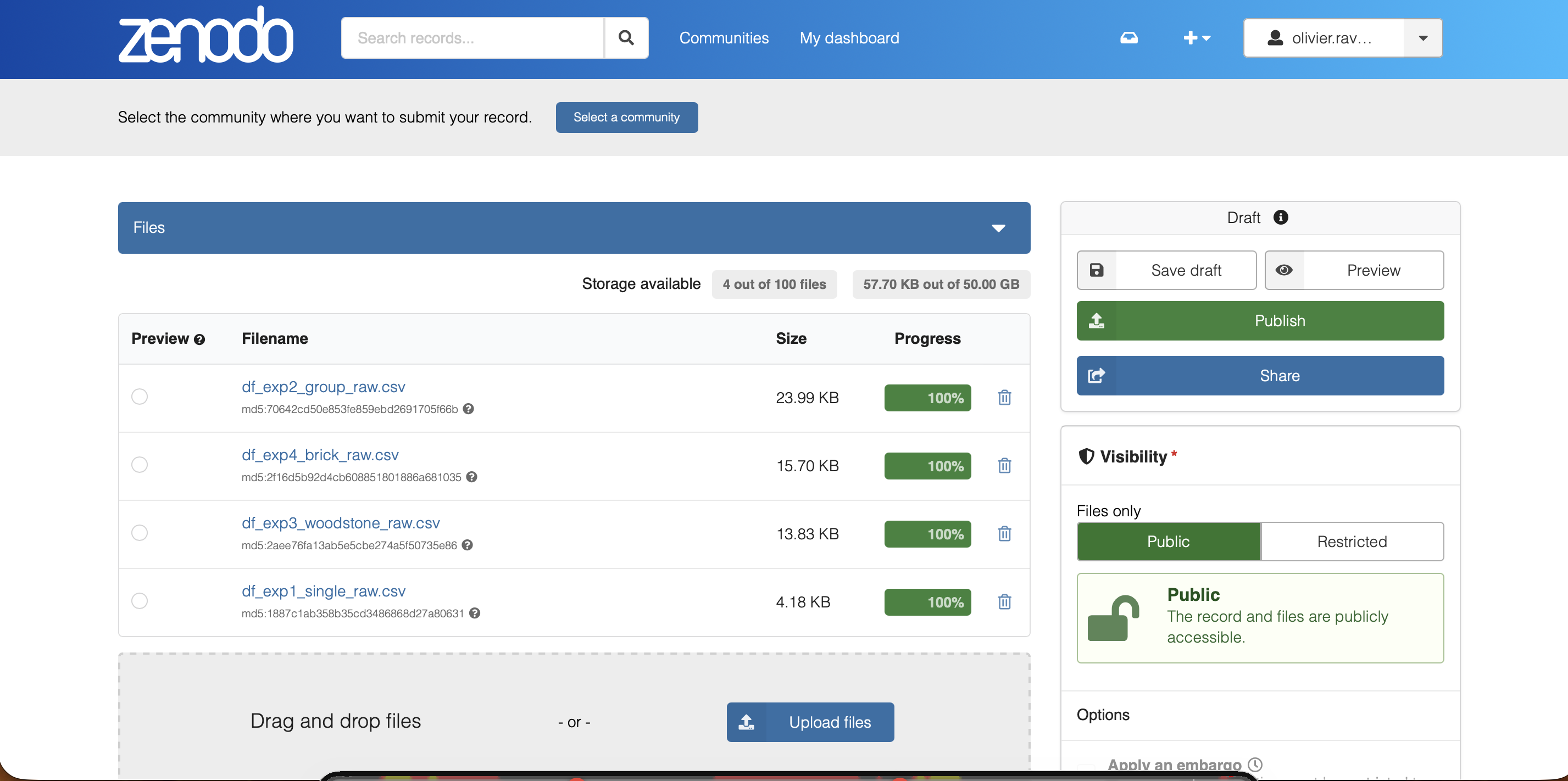
The real Zenodo upload screen. Reserve DOI lives further down, in the identifiers section.

Reviewers reach your code via the public GitHub URL — mention it in your cover letter, not just the data availability statement. Double-blind? Use an Anonymous GitHub mirror instead.

Licensing & keeping things secure

Defaults that satisfy nearly every journal/funder:

CC BY 4.0 The default for data — reuse allowed, attribution required

MIT The default for code — permissive, minimal restrictions

CC BY-NC Blocks commercial use, if that matters for your work

GPL Keeps derivatives open-source too

A license controls reuse, not access — it doesn’t hide anything

Sensitive data (privacy, sovereignty, endangered species locations)? Use Zenodo’s access right setting: Open, Embargoed, or Restricted (metadata public, files require your approval) — not a stricter license.

After acceptance

  • Final commit: "final version — accepted by [Journal]"
  • Sync to GitHub
  • GitHub → Releases → Create release → tag v1.0
  • zenodo.org → find draft → Publish
  • Update data availability statement

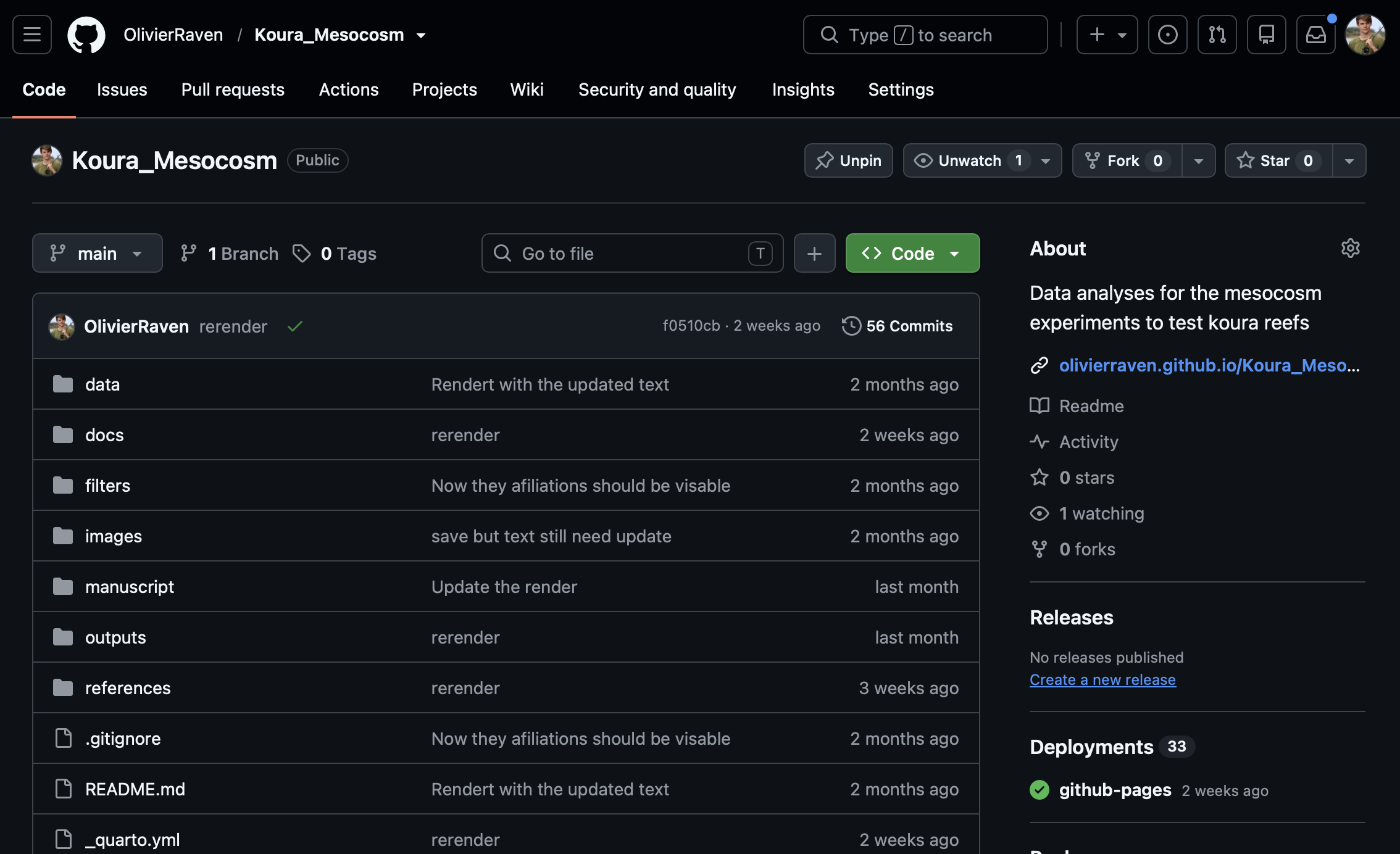
A real repo — “Releases” and “Create a new release” sit in the sidebar, bottom right.

Zenodo automatically archives the release and locks the DOI

What you get

  • Complete version history of every decision
  • Permanent, citable DOI for code and data
  • Fully reproducible analysis
  • Reviewer access without extra effort
  • Manuscript produced directly from the same code

Where this goes next: living papers

  • Today, this workflow ends at acceptance — one archive, done
  • A living paper keeps evolving after that point, without ever touching what’s already published

The published DOI never moves.

Concept DOI vs. version DOI — that’s the anchor everything else hangs off.

Missing renv.lock → v1.1

→

Reviewer question answered → v1.2

→

Next season’s data → v1.3

The hard call isn’t technical — it’s deciding when a change is a new version of this paper versus when it’s actually a new paper.

Questions?

Olivier V. Raven

University of Waikato | ScienceEcosystem.org

olivierraven.github.io/Open_Research_Workflow

Full guide, further reading, and this deck’s own source — all at the link above.